Time Blocking Chrome extension
Block
A Chrome extension for focus, inspired by Severance and Brick. You plan your productivity, and Block removes distraction.
Details
- Role
- Concept, product design, motion and development
- Built with
- WXT, React, TypeScript, Chrome's declarativeNetRequest API, Claude Code
- Status
- Shipped extension, installable from GitHub: https://github.com/ConnColl/block-extension
The problem
Focus in the attention economy.
Almost every site on the internet is designed by a team whose job is to keep you there. Against that, willpower in the moment is a bad strategy. You don't lose focus because you decided to. You lose it because a tab was open and a thumbnail was there.
Most blockers work from a blacklist: you list the sites that distract you and hope you remembered them all. The list is always one site short, and turning it off takes one click, made by the exact person the blocker was supposed to protect you from.
The idea
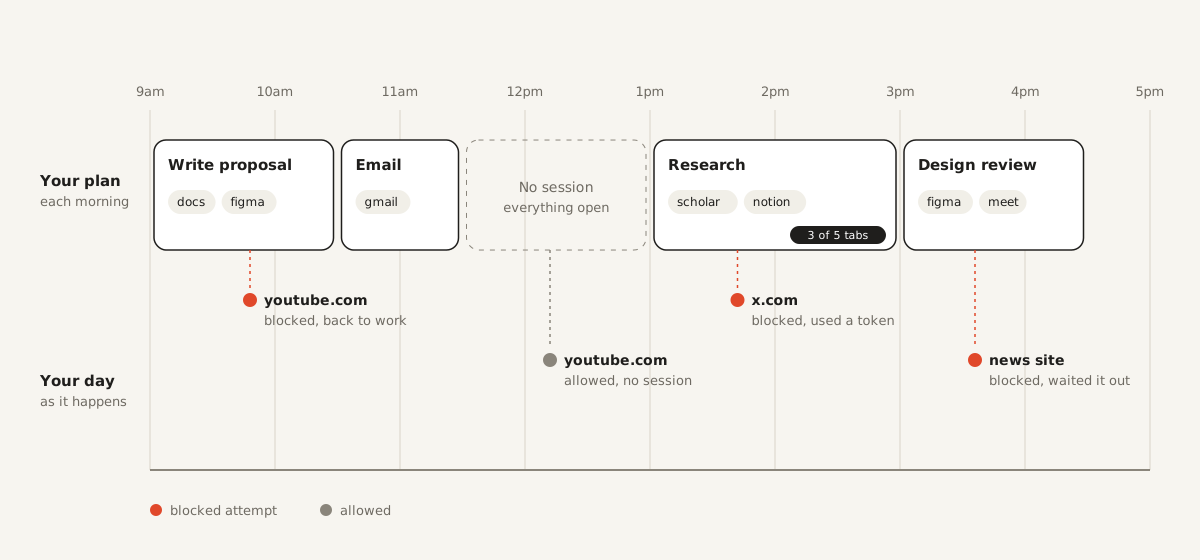
Time blocking, but enforced. Each morning you plan your tasks, their time blocks and the few sites each task actually needs. During a focus session, only those sites load. Everything else is blocked.
The morning you is calm and clear-headed. The person at the keyboard at 2pm is neither. Block removes not only distraction, but also decision fatigue.
Two things shaped it. Brick, the little device that locks the apps on your phone until you tap it again, proved people will pay to take choices away from themselves. Severance gave me the frame: a version of you who decides the rules and a version of you who lives inside them. Block is the gentle version of that split. You set the rules for yourself, in advance, when you're at your best.
Designing the rules
An allowlist, not a blacklist. Instead of guessing everything that might distract you, you name the handful of sites the task needs. It's a shorter list, it's easier to get right, and it closes the gaps a blacklist always leaves.
Friction goes where the risk is. Planning is quick and easy, because that's the moment you're thinking clearly. Leaving a session is slow and deliberate, because that's the moment you aren't.
No shame. The blocked page doesn't scold, and a missed task is just marked missed. The tool is on your side, even when you slip.
The core loop
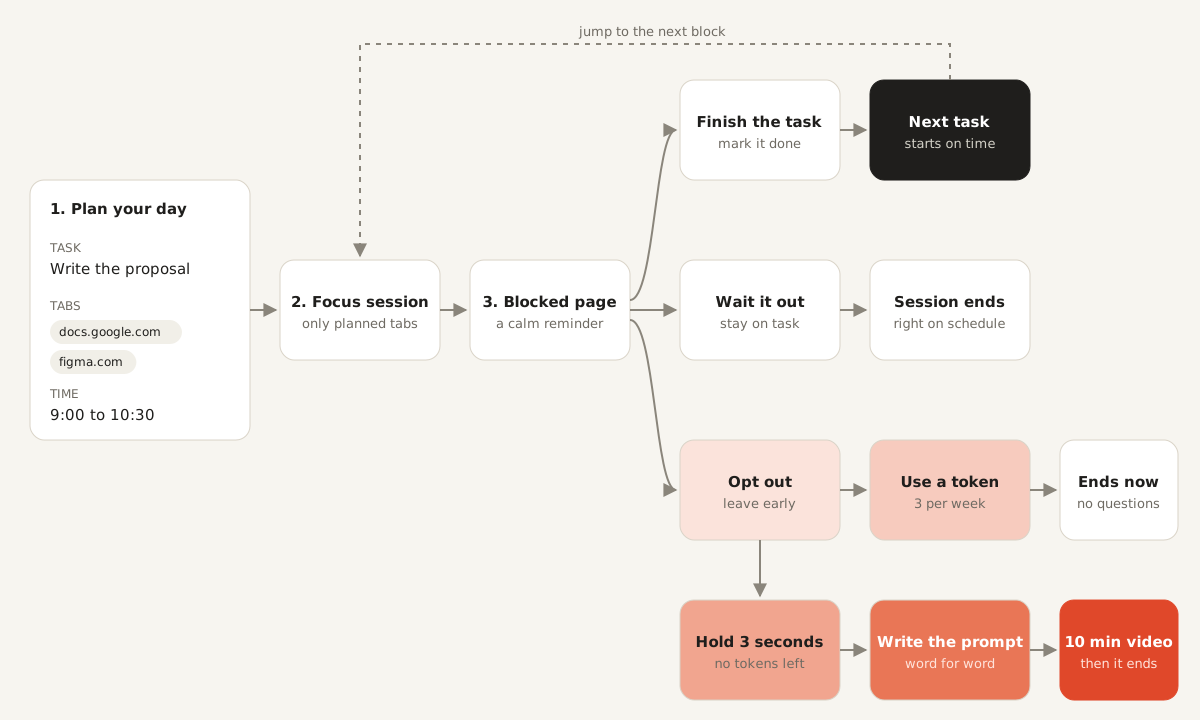
- Plan: add tasks with applicable tabs and time.
- Focus session: starts on schedule. Any site outside the task's allowlist is blocked.
- Blocked page: a calm stop that shows your task, the time left and allowed sites.
- Tab limit: five tabs during a session, with a gentle note when you hit it.
- Finish: when the session ends, you mark the task done or missed.
Friction, not punishment
The blocked page is gentle on purpose. It isn't there to scold you, only to remind you what you chose.
Leaving a session early is different. You're allowed to, but it costs something, and the cost goes up the more you do it. You get three passes a week. After that, you hold a button for three seconds, type a confession sentence word for word, and sit through a ten-minute motivational ad break you can't skip. By the time it's over, the urge has usually passed, which is the point.
Every step is designed to buy time rather than punish you. Holding a button takes three seconds of commitment. Typing a sentence about your own task makes you read what you're walking away from. Ten minutes is long enough for most urges to fade on their own.
The motion principle: friction
Most interface motion tries to get out of the way. Block uses motion to slow you down, but only where slowing down protects you. The hold bar fills at a steady speed so you can feel the time passing. Letting go snaps it back instantly, so the choice always feels like yours.
Everywhere else, the motion stays calm and quick. The blocked page settles in softly instead of flashing a warning, because the moment you hit a block is when you most need the interface to be kind.
How I built it
Block is a real Manifest V3 extension. Blocking runs on Chrome's declarativeNetRequest rules, so it holds up without constant background work. I built it with Claude Code one milestone at a time, starting with the morning plan.
The hardest bug was in the ad break. Its video plays through a small page hosted on my site, which talks to the extension through two layers of iframes. The first message between them sometimes got lost, so the video wouldn't start. The fix was to repeat the handshake until the other side answered, which took it from working one run in five to ten in ten. The final test ran under Chrome's real autoplay rules, in a normal browser profile.
What's next
AI-drafted schedules, calendar sync and a weekly look at when your overrides happen. I kept these on the roadmap and just shipped the MVP.