Works best on a wide screen. Open Glyphwork full screen
Custom Font Workspace
Glyphwork
A font creator where you shape letters by hand and AI can imagine the rest of the alphabet.
Details
- Role
- Concept, design and development
- Built with
- Paper.js, opentype.js, the Claude API, Next.js, Claude Code
- Status
- Shipped
The problem
Designing a typeface means making hundreds of related decisions across the alphabet.
The idea
What if you made a few of those decisions by hand and got suggestions for the rest? You type a word, reshape its letters directly, and ask AI how the rest of the alphabet should look in your style. You stay the designer. AI drafts.
How it works
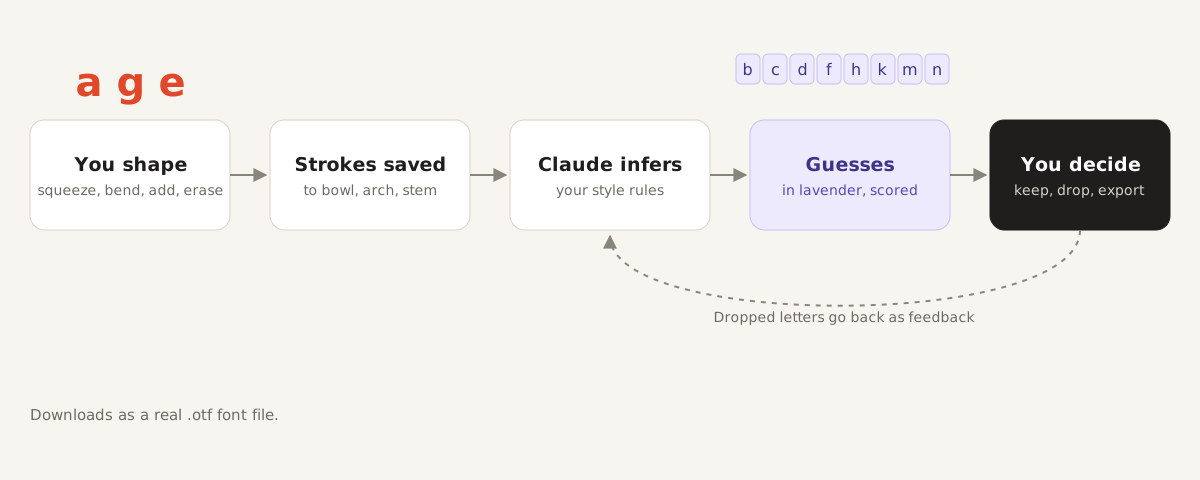
You start with a word set in Karla, an open source sans serif, drawn large against the guidelines type designers work with. Four brushes reshape it: Squeeze, Bend, Add and Erase.
Every letter is shared across the font. Change the l in "hello" and both l's change, along with the alphabet strip and the preview sentence below.
Echo copies a stroke onto the same part of every letter. Pinch the bowl of the o, and every bowl in the alphabet gets the same pinch.
Designing with AI
Predict the rest sends Claude a record of your strokes. It replies with the style rules it noticed and which of your strokes to reuse on each remaining letter.
Its guesses show up in lavender with a confidence score, so they never pass for your own work. You keep or drop each one, and dropped letters go back as feedback on the next prediction. When you're happy, you download a real .otf file you can install and type with.
Why strokes, not pixels
Each stroke is recorded against a named part of a letter, like a bowl, an arch or a stem. That's what lets Claude reason about your style, and it's why the results come back as clean, editable outlines instead of images.
The motion principle: direct response
The letters follow your hand. Brushes act the moment you drag, and the letterforms themselves animate, not just their position, because the shape is the material you're working with.
Keeping it safe to share
On claude.ai, predictions ran on each visitor's own account. On a public site someone has to pay for them, so predictions go through a small server route on my site. It keeps the API key private, checks every request and limits how often each visitor can ask. A monthly spending cap sits behind all of that.
How I built it
I prototyped Glyphwork with Claude, then brought it into this site with Claude Code. The tool runs as its own page inside the case study, so it didn't need a rewrite, and the prediction endpoint became a Next.js route with rate limiting.
Limits and what's next
It's lowercase only for now, and the map of where each letter's parts sit was drawn by hand, so it's approximate. Next would be uppercase letters, a morph between the original and reshaped letters, and a panel where you can edit the rules Claude finds. That last one is where designing together gets interesting.